
Photo evidence · Contractors
Photograph the condition. Caption the decision.
A useful jobsite photo answers where, what, how large, and when. A complete approval connects that image to the original scope, proposed work, price, schedule, and customer’s written decision.
The short answer
Photos support the record. They do not replace the approval.
A close-up can show deterioration but hide the room, assembly, and size. A wide shot can show location but miss the failed detail. A timestamp can support chronology but does not prove responsibility, causation, scope, price, or authorization by itself.
Capture a deliberate sequence, preserve originals, add factual captions, and link every selected image to one project and change record. The goal is not maximum photo volume. It is enough organized visual context for another person to understand the condition and the approved response later.
Six-photo field sequence
Move from location to condition to outcome.
- 01
Orientation view
Show the room, elevation, equipment, or assembly with recognizable fixed features. State camera direction and mark the affected area without obscuring it.
- 02
Original baseline
Capture what was visible or specified before disturbance: original finish, adjacent intact work, drawing location, prior repair, or approved product.
- 03
Overall changed condition
Frame the full discovery and its boundaries. Include adjacent components so the viewer can distinguish affected, unaffected, and already opened work.
- 04
Close detail with scale
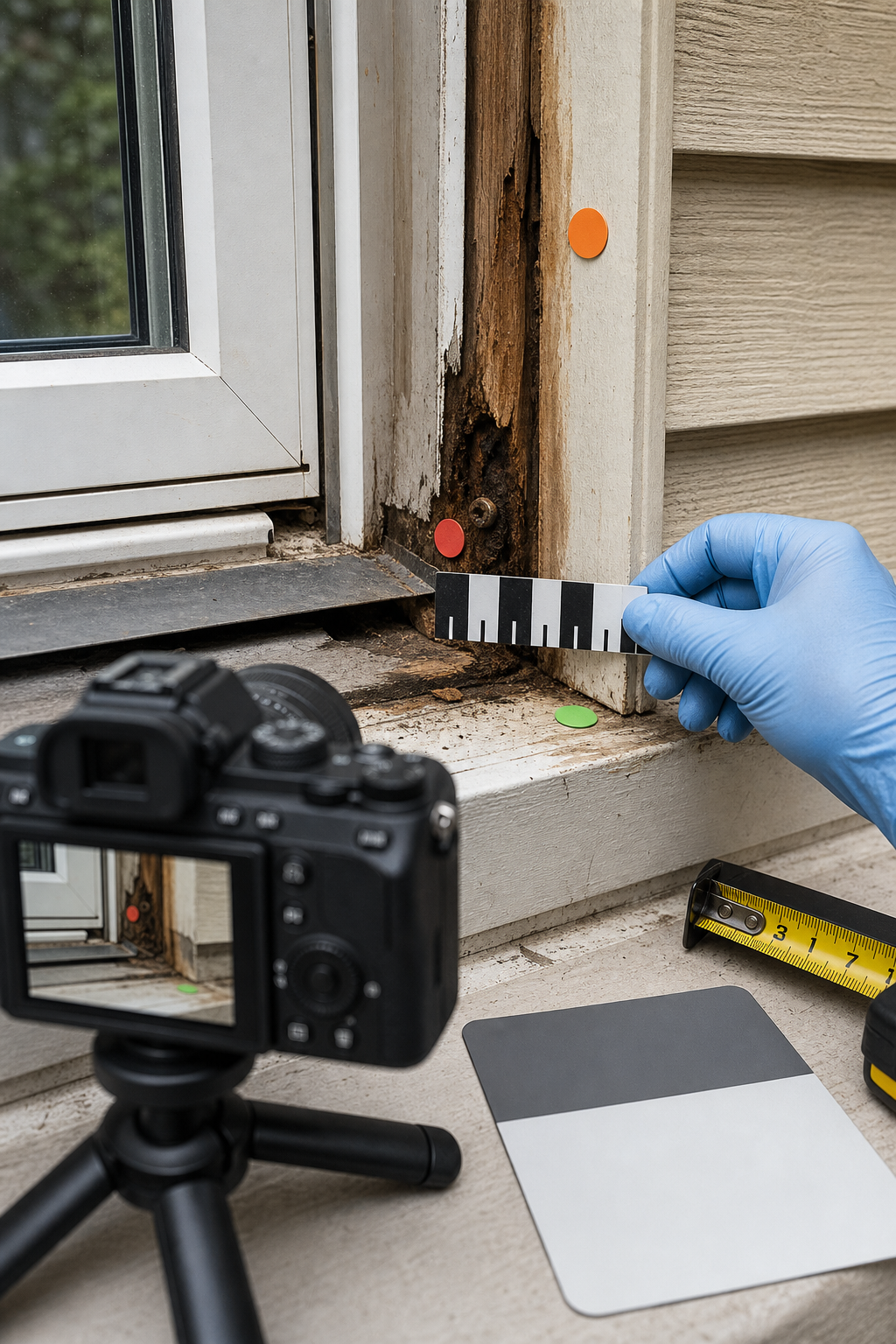
Photograph the specific defect, interface, quantity, marking, or measurement with a ruler, tape, known reference, or instrument display used by a qualified person.
- 05
Proposed scope boundary
Mark the area to remove, repair, replace, test, or leave untouched. Photograph alternate options separately so approval cannot be mistaken.
- 06
Completion or safe stop
Show installed work, test or inspection evidence, closure, cleanup, temporary protection, remaining condition, and anything requiring follow-up.
Hidden-water-damage example
Six frames that tell one coherent story.
North living-room window
Full wall from doorway, window identified by fixed adjacent outlet and trim profile; affected lower-right corner marked.
Trim before authorized removal
Paint separation and staining visible; adjacent left corner appears intact; image taken before access work.
Opened sill and jamb
Full approved opening shows darkened sill, jamb end, fastener, flashing edge, and intact framing above.
Deteriorated jamb with scale
Close perpendicular view includes physical scale and reference marker; caption reports observation without diagnosing unsupported cause.
Proposed repair limits
Marked photo distinguishes replacement area, adjacent retained framing, exterior access, and finish restoration excluded from this approval.
Temporary closure or completed repair
Shows protected opening or repaired assembly, test/inspection reference, remaining finish work, cleanup, and next approval if needed.
Field template
Extra-work photo log
Use one row per selected image. Keep originals in the project folder and attach review copies to the approval.
Attach photos to a JobSign change approval →- Stable photo ID
- [Project-change-date-sequence; e.g., JS104-CO07-20260711-01]
- Original filename & file
- [Device filename, format, pixel dimensions, original storage path, checksum if your process uses one]
- Capture date/time
- [Device timestamp, timezone, and any known clock discrepancy; do not alter to fit the narrative]
- Photographer
- [Name/role/company; who directed any measurement, test, or marker placement]
- Location & orientation
- [Property, floor, room/elevation/component, viewpoint, camera direction, fixed landmark]
- Stage / view type
- [Before / discovery / during / boundary / completed / temporary; orientation / overall / detail / scale]
- Factual caption
- [What is visibly shown, relevant size/quantity, adjacent reference, and why this frame is included]
- Scale / measurement
- [Reference object, ruler, instrument, person who measured, units; state if scale is absent or approximate]
- Related record
- [Contract scope, drawing, RFI, work order, change ID/revision, T&M ticket, inspection, receipt, test]
- Privacy / access review
- [Occupants, children, addresses, keys/codes, valuables, plates, documents, screens, medical/personal items; share restriction]
- Working derivatives
- [Annotated, cropped, redacted, compressed, or converted copy; editor, date, purpose; original remains unchanged]
- Retention & delivery
- [Project folder/category, backup, retention rule, approval attachment page, delivered copy/date]
A photo log supports retrieval and context. It does not determine admissibility, causation, fault, compliance, or customer authorization.
Capture rules
Make the image understandable without standing beside it.
Wide, medium, detail
Use overlapping views so the close defect can be traced back to the overall location.
Straight, steady, and repeatable
Shoot perpendicular when documenting size or alignment, avoid digital zoom, hold adequate light, and repeat the same viewpoint after work.
One plane, known reference
Place the scale beside the feature on the same plane without covering it. Record units and do not infer precision the photo cannot support.
Use caution with appearance
Lighting, white balance, screens, compression, and surrounding colors can shift finishes. Keep physical samples and product references when color matters.
Observe, do not speculate
Write “darkened wood and corrosion visible” rather than assigning cause or responsibility beyond your qualification and evidence.
Include what is not changing
Untouched adjacent work, exclusions, temporary conditions, and remaining work help define the actual boundary.
File discipline
Preserve originals. Work from copies.
Keep first-generation files
Retain the file captured by the device with available metadata; do not make an annotated screenshot your only record.
Label every edited copy
Crop, brighten, annotate, redact, or compress a separate version and record what changed.
Use project and change IDs
Connect folder, filename, caption, approval attachment, field ticket, and invoice to the same identifier.
Review privacy before sharing
Exclude or redact unrelated people, children, access credentials, addresses, valuables, screens, and personal records while preserving the controlled original appropriately.
Weak vs. useful
Fix the evidence gap while the site is still open.
One extreme close-up
No location, orientation, scale, or adjacent reference.
Useful
Orientation, overall, and detail views share landmarks and a stable photo ID sequence.
Screenshot from a message
Compressed, renamed, missing metadata, and detached from its source.
Useful
Original preserved; review copy attached; message and approval reference the stable photo ID.
Marker covers the damage
Annotation obscures the condition or suggests a boundary not visible in the original.
Useful
Unedited original plus a labeled derivative with a thin boundary that leaves the evidence visible.
After photo only
Shows a finished surface but not the prior condition, concealed work, test, or scope.
Useful
Before, during, and after sequence tied to work records and acceptance criteria.
Research basis
Organized photos become retrievable project records.
Caltrans Construction Manual guidance organizes routine photo records by before, during, and after construction; it calls for identification, organized digital files, and separate handling for claim-related photos. Its structure-construction guidance explains that photographs support administrative decisions and that useful future needs are not always obvious at capture time.
National Archives guidance for permanent federal photographic records is more formal than a contractor job file, but its principles are valuable: unique photo IDs, captions explaining who/what/when/where/why, original-generation JPEGs, descriptive and technical metadata, EXIF when available, finding aids, and quality checks. These sources guide record quality; they do not determine private-project evidence rules.
- Caltrans Construction Manual 5-1: photo records ↗
- Caltrans: construction photos and videos ↗
- National Archives: digital photographic records ↗
- National Archives: electronic-record metadata ↗
Confirm the project’s consent, privacy, confidentiality, safety, site-access, insurer, discovery-hold, retention, and evidence rules. Do not photograph where prohibited or expose sensitive customer information merely to improve documentation.
Construction photo questions
What photos should I take?
Capture orientation, baseline, overall condition, scaled detail, proposed boundary, and completion or safe stop, plus any important concealed process.
Are photos enough to authorize extra work?
No. Link photos to written scope, price, payment, schedule, authority, and customer approval.
Should I keep original files?
Yes. Preserve original-generation files and available metadata; create separate annotated, compressed, or redacted working copies.
How should photos be captioned?
Identify photo ID, location, time, orientation, visible condition, scale, stage, and its relationship to the specific change record.
Show the condition once
Put the right photos beside the written decision.
JobSign helps contractors capture the field condition, draft the extra-work scope, attach photos, collect approval, and share the completed PDF.
Create a photo-backed change →